WStatMap-Weather Map Live: Direct Station Observations on Android
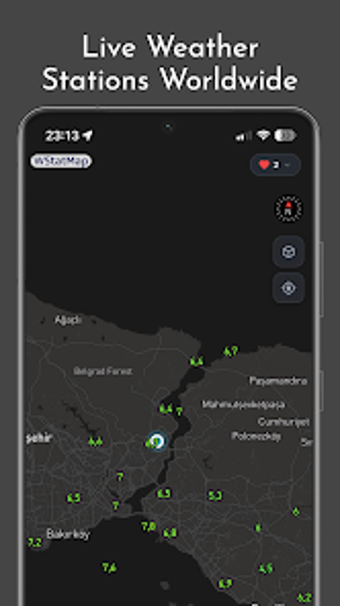
WStatMap-Weather Map Live, by Conaco, is an Android app for exploring raw meteorological observations on a global interactive map. The app centers on live station data as its main functionality, presenting measurements rather than simplified forecasts. Weather enthusiasts, amateur meteorologists, and travelers can compare regional conditions quickly, with multi-language menus and customizable map layers helping the interface fit different display preferences during everyday planning.
What does WStatMap offer for short-term analysis?
The app emphasizes recent measurements and model comparisons for quick analysis. It provides a 48-hour historical view and visualized charts that make short trends visible, useful when checking hourly shifts. The tool also supports selected numerical weather prediction models for temperature, enabling side-by-side inspection of observations against model outputs rather than relying solely on summary forecasts.
How does WStatMap fit into device workflows and quick checks?
The app supplies fast visual output and home-screen access for daily glances. The Android release renders map data quickly and supports widgets for immediate updates on the device home screen. Cross-platform listings show builds for iOS, iPadOS, and Apple Watch, which helps those who move between phones, tablets, and wearables and expect consistent map-based displays across gadgets.
Is WStatMap practical daily, and who benefits most?
Regular use rewards people comfortable reading raw meteorological numbers. The lack of account requirements keeps setup quick and reduces account-linked data handling, so users start checking observations immediately. Widgets and charts support recurring checks for short-term planning, making it a fit for weekend planners, amateur meteorologists, and travelers who prefer measured conditions over interpretive summaries.
To sum up, WStatMap suits observers who prefer measured data
WStatMap is a practical option for people who base daily decisions on measured local conditions and direct comparisons. It is less suitable for users who need narrative, interpretive weather guidance instead of raw readings. Establish a consistent checking habit to notice short-term shifts; that routine makes the app most useful for planning or analysis driven by observed local conditions rather than summary advice.